

EDITOR’S NOTE: This is the second of two articles exploring how leaders are driving AI adoption and helping teams develop AI skills. (Read the AI adoption article here.)
Organizations everywhere are scrambling to build workforce AI skills. But some training tactics are far more effective than others. Which methods work best?
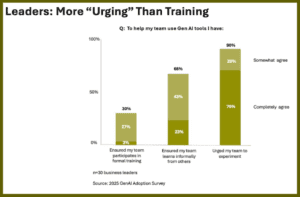 According to former Gartner analyst Eric Braun, 90% of leaders are urging team members to experiment with AI. Clearly, top-down encouragement is beneficial. But is it enough?
A closer look at Braun’s research exposes a significant gap. Although most leaders support AI skills development, only 23% actually ensure that people are learning informally. Even more strikingly, only 3% require formal training.
We’re interested in learning more about those who actively invest in AI upskilling. So, we partnered with Featured.com to ask business leaders this question:
“What is one thing you’re doing to help your teams become digitally fluent, comfortable with AI adoption, and able to act as AI advocates?”
Of the 25 responses we received, 12 emphasized change management. We published those answers last week. Now, we’re turning to the remaining 13 recommendations, which focus on training practices:
- Facilitate Peer Prompt Sessions
- Pair Confident Mentors with Curious Learners
- Host Brief Labs on Daily Tasks
- Embed Micro Lessons Inside Current Routines
- Insist on Daily Use and Results Sharing
- Rotate Staff through Experienced Teams
- Offer Open “AI Office Hours”
- Lead Practical Skills Workshops
- Schedule Tuesday Reviews and Track Gains
- Provide Department Sandboxes with Safe Credits
- Mandate Human-Led Copilots
- Document Results in a Shared Playbook
- Certify Proficiency and Ethical Practice
For detailed answers, read on…
Don’t miss what’s happening at the leading edge of enterprise learning technology! Get our weekly email brief. SUBSCRIBE HERE →
13 Ways Leaders Are Building Workforce AI Skills
1. Facilitate Peer Prompt Sessions
 What works best for us is peer-led prompt sessions, where once a week, a team member shows us how AI saves them time.
Recently, our underwriting lead walked us through how to use a structured prompt to pull data about changes in lender criteria from 15 PDF documents. In the past, this took him 2 days of manual comparison. Everyone watched his exact steps and results. Then they tried it with their own information.
These hands-on sessions build digital fluency much faster than generic training because people learn within their everyday work context. The discussions help us catch mistakes early and improve prompt templates over time. Also, when someone shares a win, it motivates the rest of us to keep moving forward.
— Holly Andrews, Managing Director, KIS Finance
2. Pair Confident Mentors with Curious Learners
 We’re creating internal training partnerships to bolster AI readiness. So, rather than expecting people to figure out new AI tools on their own, we’re pairing digital native employees with those who aren’t.
This sounds simple, but it truly is changing the way our people build AI skills. Putting someone who is curious together with an experienced person removes the fear factor. There’s no embarrassment or quietly falling behind. Learning happens naturally through guided repetition and reinforcement, rather than intense, mind-numbing training sessions.
Soon after each pairing, I’m hearing remarkable new conversations. Employees are swapping prompts and sharing shortcuts. And as AI becomes part of the daily office vocabulary, it increasingly fits into our culture.
— Ben Lamarche, General Manager, Lock Search Group
3. Host Brief Labs on Daily Tasks
 We run short internal “lab sessions” where everyone uses AI to build a specific deliverable that ties-in with their daily work. For example, a consultant may draft a proposal or summarize a client call.
I join the team and show them where the model helps, as well as where it fails, so people gain confidence without pressure. This casual approach works better than theoretical training because the context stays real and relevant.
As leaders, our goal is to make curiosity feel safe. Trust me, you’ll notice a difference immediately.
— Adam Czeczuk, Head of Consulting Services, Think Beyond
2026 OFFICE HOURS: If you’re buying a learning system, why not choose with confidence? Join analyst John Leh for this free 6-part webinar series just for LMS buyers. SAVE YOUR SEAT →
4. Embed Micro Lessons Inside Current Routines
 It’s hard for employees to get comfortable with new technology through lengthy training sessions. They learn by trying tools in small, low-risk moments. So, we give teams hands-on practice with AI inside the workflows they already use.
We’ve built short mobile modules that show how AI supports tasks like analyzing feedback, writing updates, or preparing SOPs. Managers also receive guidance on how to coach and spot adoption gaps.
Once people see how AI saves them time as they move through the day, they readily become advocates.
— Teri Maltais, VP of Revenue, iTacit
5. Insist on Daily Use and Results Sharing
 Our most critical move was to build AI skills internally before rolling it out elsewhere. We asked team members to use generative AI for at least one task each day for a month. Then, we compared notes on what actually helped save time.
What shocked us? The best use case wasn’t content creation. It was a custom GPT we built to analyze client Google Analytics data and automatically flag anomalies or opportunities.
Previously, this task took 2 hours. Now, our account managers spot revenue opportunities 3x faster, which directly improves client ROI. As soon as we shared these results, everyone wanted to learn how to build their own automations.
Also, because we tied AI wins directly to client results, advocacy quickly followed. For instance, when AI helped increase our LinkedIn qualified monthly sales calls from about 15 to 40, team members were eager to teach clients these workflows. Clearly, people prefer to evangelize tools that make them look like heroes.
By the way: We also created a “failure channel” in Slack where anyone can post AI experiments that flopped — no judgment. Turns out, sharing what doesn’t work kills the fear of trying faster than any training session can.
— Magee Clegg, CEO, Cleartail Marketing
6. Rotate Staff through Experienced Teams
 Our employees participate in short rotations embedded with teams that already use AI in meaningful ways. They observe how prompts are refined, how outputs are validated, and how accountability stays with humans.
This hands-on exposure quickly removes the fear and mystery that tends to surround AI. People return to their teams with real examples, practical knowledge, and the confidence to coach peers through adoption.
— Tom Rockwell, CEO, Concrete Tools Direct
Celebrate the best in learning tech innovation! See our latest annual LMS Award recipients, featuring 65 top solutions in 6 categories. SEE ALL THE WINNERS →
7. Offer Open “AI Office Hours”
 People were hesitant to interrupt colleagues with small AI-related questions. So, we implemented weekly “AI Office Hours.” During this time, anyone in the company can book a short session with our tech team to ask AI-related questions.
These dedicated sessions provide a safe space for individuals to get help. For example, someone from our sales team might ask, “How can I use AI tools in our CRM to find the best leads?” Then, the tech team walks through it, explaining exactly how the feature works.
This makes AI more accessible and less intimidating. It also gives our team the confidence to experiment with new tools because they know expert guidance is readily available.
— Paul Eidner, Chief Operating Officer, InboxAlly
8. Lead Practical Skills Workshops
 We prepare teams for AI integration through hands-on training workshops that build digital fluency and encourage adoption. Participants learn core AI tools for stock trade analysis and platform optimization, so they become comfortable with daily use and grow confident in guiding others.
Sessions include practical exercises on AI-driven journaling and performance metrics, where teams import real trade data and interpret AI-generated trading patterns and risk insights.
This helps staff adopt tools and prepares them to explain benefits to new users. It also aligns with our focus on providing precise analytics for traders worldwide.
— Richard Dalder, Business Development Manager, Tradervue
9. Schedule Tuesday Reviews and Track Gains
 I’ve built IT and security infrastructures for 17+ years, so when AI started gaining traction, I knew we had to practice what we preach.
This is why we launched weekly AI briefings for our team. Every Tuesday morning, we spend 30 minutes dissecting one AI tool or trend. And then, by Friday, each person suggests one way it can solve a real client problem.
Hands-on immediacy is the game-changer. Our junior techs were nervous about looking stupid, so we created a low-key “AI screw-up of the week” Slack channel to share our worst AI failures.
Last month, one person accidentally led a chatbot to draft a hyper-formal email to a dental client that used the term “optimal mastication protocols” instead of “chewing.” We all laughed, quickly fixed it, and he learned prompt engineering faster than any tutorial could teach.
What turned our people into advocates was per-person AI time savings. We started logging hours spent on documentation, email responses, and basic network diagnostics. Three months later, we had saved an average of 6.2 hours per person per week.
When people are leaving work earlier or tackling projects they enjoy instead of slogging through repetitive tickets, they start evangelizing AI, even to skeptical clients.
— Ryan Miller, Managing Partner, Sundance Networks
NOW PLAYING ON YOUTUBE: Dig into our growing collection of learning systems Hot Take video reviews with Lead Analyst, John Leh. SEE ALL HOT TAKES →
10. Provide Department Sandboxes with Safe Credits
 We created “AI Sandboxes” for every department (not just engineering), including pre-allocated Azure and OpenAI API credits. This lets employees use AI technologies without fear of running-up costs or leaking sensitive information.
By encouraging people to create low-code prototypes that solve their own workflow challenges, we’ve seen many innovations come from these environments. For example, the HR department created a candidate screening assistant in their AI sandbox, using a basic RAG pipeline.
Compared to theoretical workshops, this hands-on experience has helped our staff rapidly build trust and comfort with AI technologies. It has also reduced the volume of manual data entries across non-technical teams by 40%. This confirms that experimentation is a more powerful way to gain AI fluency than passive observation.
— Pratik Singh Raghuvanshi, Team Leader Digital Experience, CISIN
11. Mandate Human-Led Copilots
 We built an AI copilot tool and forced everyone to use it daily.
This copilot is a custom AI system built on Google Gemini, trained on SEO methodology, our client work, and 30 years of my expertise. All of us use it for research, analysis, competitive intelligence, and content outlining. But the keyword is “use,” not “depend on.”
Here’s our training philosophy: AI fluency isn’t about knowing how to prompt ChatGPT. We teach our team the “human-driven/AI-assisted” model. AI handles grunt work while humans make strategic decisions.
Example: When our content team creates a blog post, our copilot analyzes top-ranking pages, identifies content gaps, and suggests structure. But the writer still researches original sources, fact-checks everything, adds client-specific examples, and injects personality.
AI reduces the research phase from 4 hours to 30 minutes. And the writer spends this saved time making generic content genuinely valuable.
We also run weekly “AI workflow reviews” where team members share how they’re using AI, what’s working, and what has failed. This creates a culture where experimentation is expected and failure is a learning opportunity.
The result? Our team sees AI as amplification, not replacement. They’re producing 3x more strategic content now, without working longer hours. And their quality has improved because they spend time on tasks tied to their expertise, rather than tedious research.
Here’s what doesn’t work — giving your team access to ChatGPT and hoping they’ll figure it out.
You need structure, training, and clear guidelines on when to use AI. We have clear rules: AI can draft; humans must verify. AI can research; humans must synthesize. AI can suggest; humans must decide.
Advocacy is a by-product. When team members see AI saving them hours of tedious work, they quickly become evangelists.
— Chris Raulf, Founder, Boulder SEO Marketing
Don’t miss what’s happening at the leading edge of enterprise learning technology! Get our weekly email brief. SUBSCRIBE HERE →
12. Document Results in a Shared Playbook
 We’ve developed an in-house knowledge base that lets our content marketing staff post each of their AI workflow tests and explain what worked. This is important because many organizations either completely block AI, or they give everyone access with no explanation about how to use these tools or how they add value.
By using the knowledge base, our content team optimizes at least 40% more articles each month. It also helps writers use AI to research topics and structure outlines, so they can concentrate more fully on each article’s editorial polish and strategic placement.
This documentation process is a way of championing new tools and prompts, because everyone can clearly see the benefits of applying AI in a specific way. Also, they can easily replicate those benefits without requiring additional training. This builds digital fluency, not through theoretical learning, but through practical application of tools.
— Shahid Shahmiri, Founder, Marketing Lad
13. Certify Proficiency and Ethical Practice
 The most impactful way we prepare our teams for AI is through our Mandatory AI Fluency Certification Program. This goes beyond simple tool training to focus on ethical integration, workflow mastery, and how to serve as internal AI advocates.
The program is not just about using ChatGPT. It’s about shifting the cultural mindset from fear of replacement to mastery of augmentation. It revolves around two components:
- AI Workflow Mastery (“How-To”)
Every team member must pass modules focused on specific, integrated AI applications. For example, marketing teams must certify on using AI, not only for writing, but for predictive analytics and content summarization. This ensures they know how to connect tools like our CRM, analytics platform, and generative AI APIs to achieve meaningful business outcomes.
- Ethical Advocacy and Governance (“Why”)
This ensures that we all understand how data security, bias recognition, and responsible AI use aligns with our enterprise policy.
Certified employees serve as AI Digital Guides for their teams. This means they advocate for efficient, effective AI use and act as the first line of defense against misinformation and security risks. We also ask them to host internal “Lunch & Learns” that showcase successful AI workflows and encourage a bottom-up adoption culture.
This certification program has led to measurable AI fluency improvement. It helps every employee adopt AI because they understand its boundaries and potential. It also turns hesitant users into internal experts who drive organizational change and accelerate our digital transformation journey.
— Aniket Kumar, Lead Digital Marketing, Kellton

RSVP NOW
2026 OFFICE HOURS
FOR LMS BUYERS
If you need a learning system to support workforce training, why not choose with confidence? Join analyst John Leh for this free 6-part webinar series just for LMS buyers…
Need a Learning System for AI Skills Training? Let’s Talk
Get personalized guidance you can trust. Schedule a free 30-minute consult with Talented Learning Founder & Lead Analyst, John Leh…
*NOTE TO SALESPEOPLE: Want to sell us something? Please contact us via standard channels. Thanks!
Share This Post
About the Author: Kathleen Kruse

Related Posts
2026 LMS Awards: Best Enterprise Learning Systems
Which enterprise learning systems are best? Find out about top solutions as our Lead Analyst, John Leh, reveals winners of our 2026 LMS Awards!

Your LMS is Not Your Learning Ecosystem: Why Infrastructure Maturity Matters
Does your organization rely on multiple learning systems and tools? That doesn't mean it's a coherent learning ecosystem. Find out how to assess the maturity of your tech stack...

Breaking Down Learning Silos: 4 Extended Enterprise Strategies
Want stronger results from your enterprise learning initiatives? Be sure to remove common learning silos. These strategies will help...

Want to Replace Your LMS? Start With a Reality Check
Should you replace your LMS? Before moving forward, it's smart to weigh the pros and cons. This case study illustrates how the process works...

5 Essentials for a Great LMS RFP | Customer Ed Nugget 35
Finding the right customer education platform often starts with a request for proposal. But what does it take to write a great LMS RFP? John Leh explains on this mini-podcast...

Learning as a Revenue Growth Engine: 5 Strategies for Associations
Associations often depend on member dues for revenue growth. But these days, non-dues education programs are more effective. What strategies work best?

How to Measure the Business Impact of Professional Education Programs
Are your professional education programs as successful as they could be? To improve their business impact, try this measurement framework...

Don’t Cut Training Content. How to Reuse, Refresh, or Rebuild Instead
In a world where learning organizations must do more with less, how can you make the most of training content? These strategies can help...
Learning System Vendors: Enter the Talented Learning Awards 2027
Awards season is under way! Find out how to enter the 2026 Talented Learning Awards to showcase your learning solution, gain industry recognition, and increase visibility in the marketplace...




CASE STUDY DIRECTORY


FOLLOW US ON SOCIAL