
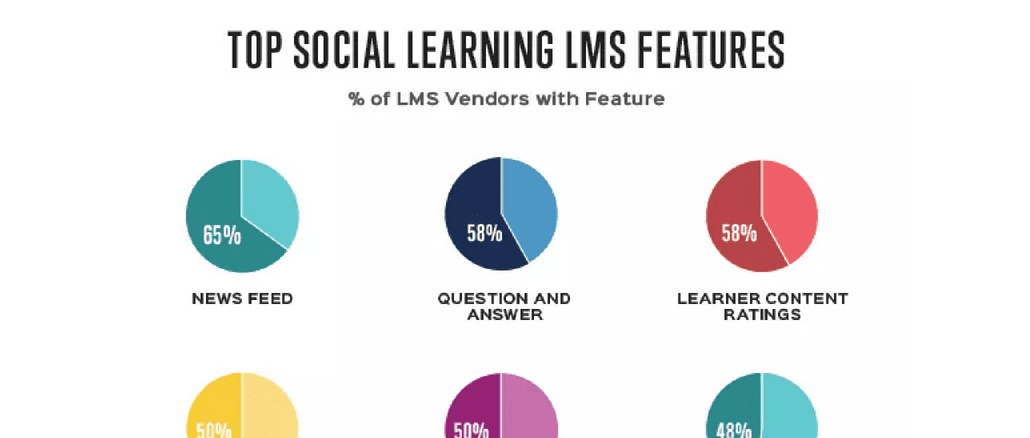
In 2016, most people are accustomed to social media and the conventions associated with profiles, friends, posts, liking and sharing. But how are these new social business behaviors influencing social learning features of today’s learning management systems (LMS)?
We wanted to find out, so we surveyed 74 diverse LMS vendors about the social learning functionality available in their platforms. We targeted the LMS vendor community because these organizations have a vested interest in developing and supporting only the features they believe the market wants and they know they can sell.
To achieve a representative sample of global demand, we limited each LMS vendor to a single survey response. Here is what we found:

What’s Going on with the Social Learning LMS?
Technically, social learning features were built into learning management systems long before social media was invented. In the 1990s, the social LMS feature set included threaded discussions, coffee groups, collaboration centers, forums, FAQ and chat — typically occupying a seldom-used tab in the navigation menu.
In reality, this social LMS feature set was all sales sizzle. Social capabilities were underutilized, mainly because no one understood how to deploy, promote and support them. Common logic was flawed — assuming training professionals and subject matter experts (SMEs) would regularly visit these social “spaces” and interact, keeping content fresh and learner engagement high. Unfortunately, content quickly became stale and learning interaction ceased.
But now, progressive LMS vendors are leveraging the recent business culture shift toward social media to fulfill the promise of social learning. Social functionality has become integral to LMS solutions for extended enterprise, ecommerce and (to a lesser degree) employee LMS solutions. These social LMS features serve many strategic business functions including:
- Community development and on-demand support
- Increased visibility to attract and retain volunteer learners
- Accelerated content curation and knowledge sharing
- Enhanced productivity for workgroups and remote team projects
- Stronger collaboration for self-paced and live instructor content (peer-to-peer and peer-to-instructor)
- Effective drip, drip, drip microlearning and marketing
With these LMS features, organizations have an opportunity to create and sustain learning communities around virtually any topic, course or idea. More importantly, people can leverage all the social behaviors they apply elsewhere to the process of learning. However, there is still tremendous room for improvement in designing and deploying social LMS capabilities. “Best practices” are still very much a work in process.
Proof of Change?
The large Talent Management providers are retaking a serious look at useful social learning after losing many pure LMS opportunities to the socially focused cloud LMSs. For example, when finalizing this post I became aware of the new SAP Jam collaboration learning platform. SAP is attempting to inject social learning into their platforms to adapt to the new way learners want to learn. The big talent LMS providers have been late to the social party– mainly because they focus only on employee development and not extended enterprise solutions where the social ROI is more evident. With the recent announcement by Workday to release their own socially enabled LMS the other Talent providers are now following suit. The behemoth laggards are finally back to investing in learning innovation.
Industry Social Learning LMS Feature Set
In addition to conducting our LMS vendor survey, Talented Learning has also conducted over 100 in-depth LMS reviews in the last two years. We have documented all the social features we encountered and divided them into two groups: basic and advanced complexity.
Basic Social Learning LMS Features
- Billboards and news
- Email and text notifications
- Question and answer tools
- Discussion boards, threaded discussion, forums and best practice centers tied to classes or topics
- Blogs — Often these look more like threaded discussion than WordPress
- “Friending” and “following” – users must become “friends” to share deeper information
- User profile (and ability to see others’ profiles) with bios, user photos, biographies and status tracking visible in LMS
- Ability to like, share and comment on content in catalog
- Ability to create and share content in user profile and in peer newsfeeds
- Ability to recommend content to peers
- Content tagging (new word for keyword metadata) and search by tag
- Most popular content, highly rated content and frequently accessed content
- Find-the-expert functionality with people search and communications via chat or mail
- Allow users to create accounts, log in, port contacts, access feeds using their existing Facebook, LinkedIn, Google+, SharePoint, Twitter or other existing social account credentials
Advanced Social Learning LMS Features
- Integrated social interface – not a separate tab in the LMS
- Intra-content social discussion for learners and teachers
- Newsfeed, leaderboard, “find expert” or other social widgets on user homepage
- Integration with existing corporate social networks (like Yammer or Bloomfire) to share courses on timeline, invite users from contact list and share success in personal feeds
- Post course enrollments, completions, awards, badges, levels or other gamification progress to external social networks to encourage comments, competition and additional enrollments
- Personal activity feeds, journals and news streams
- Ability to provide peer “recommendations” or “kudos”
- Web conference events integrated into social groups – video, screen sharing and recording
- Capture chats, video chats and webinars. Record and use for discussion and continued learning
- Polling and response stats
- Seamless integration with LMS gamification features
- Volume of comments or level of social interaction can be used as criteria for learning activity completion
- Manage social engagement of users and have relative scores for users (more engagement = higher score)
Conclusion
Use of mainstream social media has been the guiding force for social learning LMS relevance. New and progressive cloud LMS providers have been integrating the best of social media features with social learning — and guess what? It’s working.
These features don’t replace popular social channels and tools nor are they intended to do so. However, with more sophisticated social capabilities integrated into LMS platforms, organizations are finally able to create sustainable learning communities within an LMS environment. And that means the long-awaited benefits of more continuous, holistic formal and informal learning are beginning to be realized.
Thanks for reading!
WANT TO LEARN MORE? JOIN OUR MAY LIVE WEBINAR:
How to Drive Online Learning at Scale: Corporate Market Strategies for Associations
Selling online learning content to individuals is challenging enough. But selling that same content in bulk through corporate customers or partners can be even more demanding. The business models are fundamentally different. Plus, business-to-business relationships require specialized content management functionality.
What does it take to succeed?
Join John Leh, CEO and Lead Analyst at Talented Learning, as he hosts a live virtual panel with experts who have developed and managed profitable B2B online education programs:
- William Hold, Chief Development Officer, The National Alliance for Insurance Education and Research
- Linda Bowers, CTO, WBT Systems
In this dynamic one-hour roundtable, you’ll learn how to:
- Build a viable business model for bulk sales
- Develop effective pricing and marketing strategies
- Compare tradeoffs of selling through sales reps versus online channels
- Delegate content administration, reporting and user provisioning
- Integrate core learning systems with CRM platforms and other operational applications
- Achieve internal buy-in, drive project momentum and maintain organizational alignment
All live webinar attendees will receive 1 credit toward a Certified Association Executive (CAE) credential application or renewal.
Need Proven LMS Selection Guidance?
Looking for a learning platform that truly fits your organization’s needs? We’re here to help! Submit the form below to schedule a free preliminary consultation at your convenience.
Share This Post
About the Author: John Leh

Related Posts

10 Ways to Drive Revenue with an Extended Enterprise LMS
To deliver and manage this kind of training, it's wise to invest in an extended enterprise LMS -- a learning management system designed specifically for this purpose.

Top 10 LMS Demonstrators in the World
In my estimation they do most everything right -- prepare, understand business needs, know their solution at all levels, engage the audience, tell great stories and win.
Crowd Wisdom Review
The implementation team includes subject matter experts, project managers, learning technologists, project consultants, trainers, account executives, executive sponsors and data integration/migration specialists.

LMS Sales Stories: Dispatch from the Front Lines For Vendors
You can’t do too much research on your prospect, their business and their industry before and while engaging in the sales cycle -- the more you know, the better chance you differentiate from the competition.

The Important LMS Differences In Compliance, Continuing Ed and Selling CEUs
Individuals are ultimately responsible to know their own ongoing continuing education requirements, take the required training, maintain ongoing proof of completion and submit to appropriate accreditation body to maintain their license or certification.

Under the Hood of Complex CEU Management
With each incremental accrediting jurisdiction the problem compounds and becomes so complicated that many organizations can’t use a commercially available LMS to manage CEUs but rather are forced to cobble together spreadsheets, home-grown custom systems, specialized commercial CE trackers and manual processes to bridge the gap, connect the data and ensure compliance.
Intro to the Continuing Education Admin Nightmare
In the accounting industry, most accounting firms set up a National Association of State Boards of Accountancy (NASBA) license and grant continuing professional education (CPE) credit based on the NASBA standards, rather than maintain the complex CPE rules of each state

LinkedIn Learning and Workforce Development: Connecting Skills and Jobs
The emphasis on the bridging “Skills Gap” has put new life into workforce development programs globally -- and no matter what size of a population you’re targeting, in a modern world, an online platform and delivery option has to be considered – gone are the days of just meeting with a counselor to develop a plan and then sit in a classroom.

Buying a Learning System? 110+ LMS Acronyms You Should Know
I concluded that it will take too long to teach 700+ LMS vendors the new anti-acronym trick and the easiest path would be to create a living, one-sentence, non-techie dictionary of LMS acronyms for learning systems buyers.



CASE STUDY DIRECTORY


FOLLOW US ON SOCIAL